Evening coding - Python script that checks if your sites are up and alerts via SMS
 Micke Kring
·
·
5 min read
Micke Kring
·
·
5 min read
Do you, like me, have a bunch of sites you’d like to keep an eye on to see whether they’re up and running or no longer responding? Maybe you want a notification before the whole world starts contacting you? Of course there are already several really good services, like Pingdom and updown.io, but they come with a small price. If you only want a simpler service that doesn’t cost anything, why not code something yourself?
EDIT 28 December 2019: Extended script with email and simple logging is now further down.
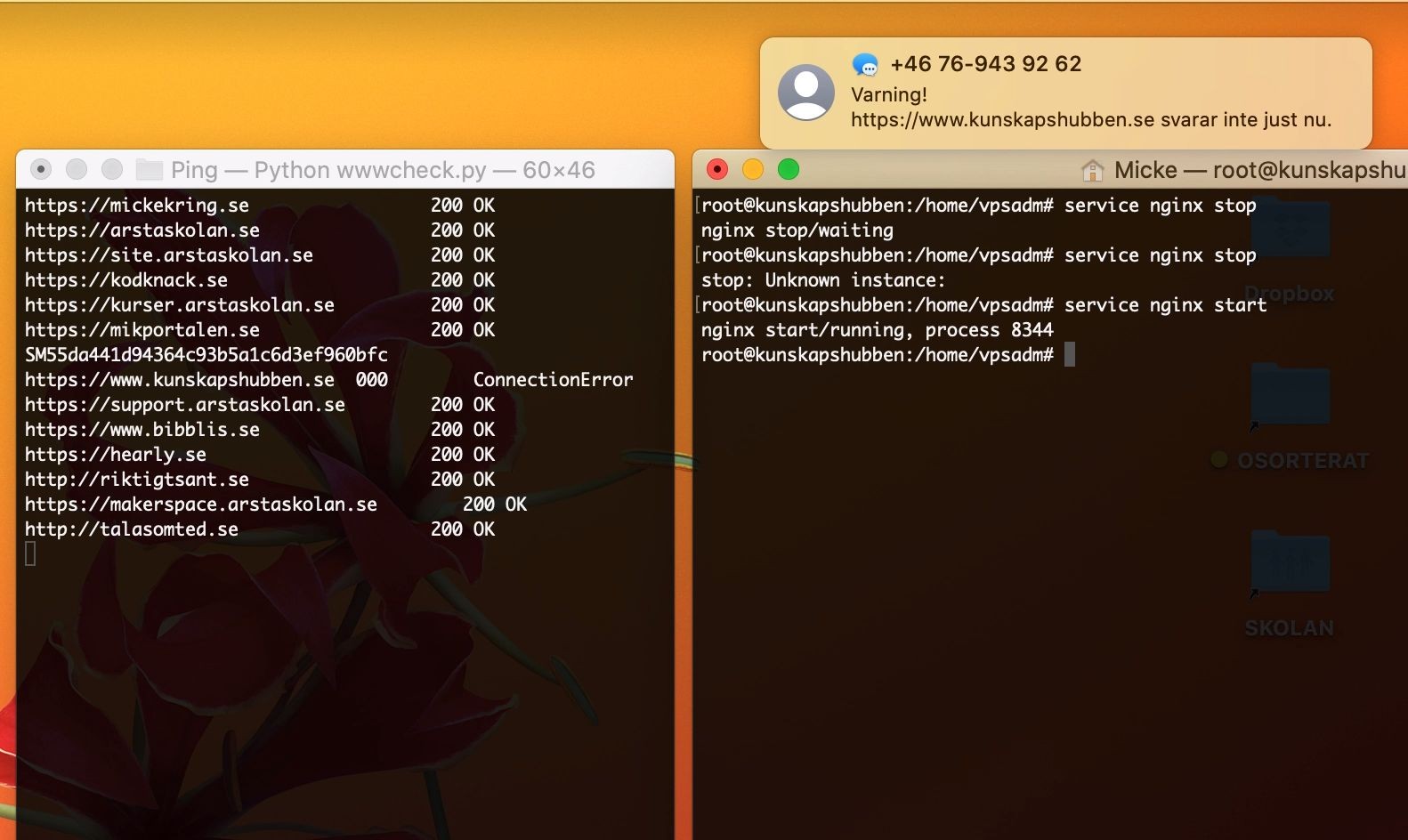
In the video below you can see two terminal windows. In the left one I’m running the script, which every 5 seconds asks the sites I specified if they’re healthy. If the sites respond with 200 everything is fine. If they aren’t healthy, an SMS is sent to me. In the right window you can see me stop the web server for kunskapshubben.se and then you see how the script detects this and sends the SMS.
This is the basic skeleton and of course we need to extend the program so it doesn’t send an SMS every 5 seconds while a site is down. But it’s a starting point. I use the service Twilio to send SMS, so you need an account and an API key. You store that info in the credentials file. Of course you could set it up so that a Twitter account sends out a tweet when a site is down. Or that an email is sent. I took the base script from https://gist.github.com/ameesters/3952890, so all credit to Martin Thoma. After that I modded it a bit and added the SMS part.
main.py
This is the file that’s run. Works with Python 3.x. In the list names add the sites you want to test.
#!/usr/bin/env python

import requests, time, os, yaml
from collections import namedtuple
from twilio.rest import Client

WebsiteStatus = namedtuple('WebsiteStatus', ['status_code', 'reason'])

names = ['https://mickekring.se', 'https://arstaskolan.se', 'https://site.arstaskolan.se', 'https://kodknack.se',
'https://kurser.arstaskolan.se', 'https://mikportalen.se', 'https://www.kunskapshubben.se', 'https://support.arstaskolan.se',
'https://www.bibblis.se', 'https://hearly.se', 'http://riktigtsant.se', 'https://makerspace.arstaskolan.se',
'http://talasomted.se']

conf = yaml.load(open("credentials.yml"))

def get_status(site):
    try:
        response = requests.head(site, timeout=5)
        status_code = response.status_code
        reason = response.reason
    except requests.exceptions.ConnectionError:
        status_code = '000'
        reason = 'ConnectionError'
        sendSMS(site)
    website_status = WebsiteStatus(status_code, reason)
    return website_status

def sendSMS(site):
    account_sid = conf["twilio"]["account_sid"]
    auth_token = conf["twilio"]["auth_token"]
    client = Client(account_sid, auth_token)
    message = client.messages.create(
        to= conf["twilio"]["to_phone_number"],
        from_= conf["twilio"]["from_phone_number"],
        body="Varning!\n" + site + " svarar inte just nu.")
    print(message.sid)

def Main():
    while True:
        os.system("clear")
        for name in names:
            site = '{}'.format(name)
            website_status = get_status(site)
            print("{0:30} {1:10} {2:10}".format(site, website_status.status_code, website_status.reason))
        time.sleep(5)
        os.system("clear")

Main()
credentials.yml
Here we store our sensitive information, like passwords and API keys.
twilio:
  account_sid: "abc123"
  auth_token: "abc123"
  from_phone_number: "+46123456789"
  to_phone_number: "+46123456789"
Extended script 28 December 2019 - part 2 - email and logging
I added some functionality: simple logging and the ability to send email instead of — or alongside — SMS. I run this in production on one of my Raspberry Pis and will come back with updates on how it’s running. Also remember to add the email password to the credentials file. In the video below you can see how it works and what happens when I shut down the school’s web servers. :)
Code
#!/usr/bin/env python

import requests, time, os, yaml
from time import strftime
from collections import namedtuple
from twilio.rest import Client
from email.mime.multipart import MIMEMultipart
from email.mime.text import MIMEText
from email.mime.application import MIMEApplication
import email
import email.mime.application
import smtplib

WebsiteStatus = namedtuple('WebsiteStatus', ['status_code', 'reason'])

### Names - Add all url's you'd like to monitor
names = ['https://mickekring.se', 'https://arstaskolan.se', 'https://site.arstaskolan.se', 'https://kodknack.se',
'https://kurser.arstaskolan.se', 'https://mikportalen.se', 'https://www.kunskapshubben.se', 'https://support.arstaskolan.se',
'https://www.bibblis.se', 'https://hearly.se', 'http://riktigtsant.se', 'https://makerspace.arstaskolan.se',
'http://talasomted.se']

### Reads passwords and stuff from file
conf = yaml.load(open("credentials.yml"))

### Creating list to save sites that are down
sentWarning = []

def get_status(site):
    try:
        response = requests.head(site, timeout=5)
        status_code = response.status_code
        reason = response.reason

        if site in sentWarning:
            sentWarning.remove(site)
            msgToSend = ("Your site - " + site + "  - is now up and running again.")
            subjToSend = "WebCheck Go - Your site is UP"
            sendMail(site, msgToSend, subjToSend)
            #sendSMS(site, msgToSend, subjToSend)
            logging(site, subjToSend)
        else:
            pass

    except requests.exceptions.ConnectionError:
        status_code = '000'
        reason = 'ConnectionError'

        if site not in sentWarning:
            sentWarning.append(site)
            msgToSend = ("Your site - " + site + " - is currently down.")
            subjToSend = "WebCheck Error - Your site is DOWN"
            sendMail(site, msgToSend, subjToSend)
            #sendSMS(site, msgToSend, subjToSend)
            logging(site, subjToSend)
        else:
            pass

    website_status = WebsiteStatus(status_code, reason)
    return website_status

def sendSMS(site, msgToSend, subjToSend):
    account_sid = conf["twilio"]["account_sid"]
    auth_token = conf["twilio"]["auth_token"]
    client = Client(account_sid, auth_token)
    message = client.messages.create(
        to= conf["twilio"]["to_phone_number"],
        from_= conf["twilio"]["from_phone_number"],
        body=subjToSend + "\n" + msgToSend)
    print(">>> Successfully sent SMS")

def sendMail(site, msgToSend, subjToSend):
    msg = MIMEMultipart()
    message = msgToSend
    password = conf["email"]["password"]
    msg['From'] = "m.m@mail.se"
    msg['To'] = "m.m@mail.com"
    msg['Subject'] = subjToSend
    msg.attach(MIMEText(message, 'plain'))
    server = smtplib.SMTP('smtp-relay.sendinblue.com: 587')
    server.starttls()
    server.login(msg['From'], password)
    server.sendmail(msg['From'], msg['To'], msg.as_string())
    server.quit()
    print(">>> Successfully sent email to %s:" % (msg['To']))

def logging(site, subjToSend):
    with open("updownlog.csv", "a") as updownlog:
        updownlog.write("\n{0},".format(strftime("%Y-%m-%d %H:%M:%S")) + site + "," + subjToSend + "")
        print(">>> Successfully logged incident.")

def Main():
    while True:
        try:
            os.system("clear")
            print("Testing sites\n")
            for name in names:
                site = '{}'.format(name)
                website_status = get_status(site)
                print("{0:30} {1:10} {2:10}".format(site, website_status.status_code, website_status.reason))
            time.sleep(5)
            os.system("clear")
        except:
            pass

if __name__ == "__main__":
    Main()
Questions?
As usual, you’re welcome to ask questions or raise things in the comments below or via any social media.